
Meeting detection
How Prismical notices a call has started and surfaces recording controls in an always-on-top widget.
The worst time to remember Prismical exists is ten minutes into a call. So the desktop app watches for meetings and offers to take notes when one starts.
How It Knows
Prismical watches for an app picking up your microphone and holding it. That's what a meeting looks like from the outside — Zoom grabs the mic and keeps it.
It waits a few seconds before saying anything, so a notification sound or a quick voice message doesn't set it off.
It doesn't read your calendar and it doesn't look at your screen. It only notices that a known meeting app is using your microphone. Prismical can link a recording to a calendar event, but that's a separate thing — see Calendar.
Apps It Recognizes
| Meeting apps | Zoom, Microsoft Teams, Slack, Webex, Tuple, Discord, WhatsApp, Aircall, VooV Meeting, Dialpad, Dialpad Meetings, Gather |
| Browsers | Chrome, Arc, Firefox, Safari, Brave, Microsoft Edge, Vivaldi, Zen Browser, Perplexity |
Browsers are included because Google Meet and half the web's calls run in a tab. Prismical can't tell a Meet call from any other tab using your microphone — it just sees the browser holding the mic — so it offers, and you decide.
If two apps are using the microphone at once, the more meeting-shaped one wins: Zoom over a browser.
The Widget
A small pill floats above your other windows. What it shows depends on what's happening:
Nothing happening
A thin sliver at the edge of your screen. Hover it and it expands to offer Take Notes.
A meeting starts
A card slides in: Meeting detected, naming the app that's using your microphone, with a Take Notes button. It clears itself after a few seconds if you leave it.


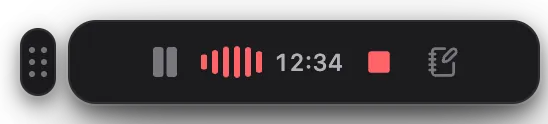
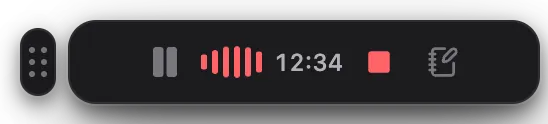
Drag it anywhere. It gets out of the way when you're looking at the main Prismical window.
Prismical never starts recording on its own. Detection only ever offers — it's your click that starts it. Nothing is captured while that pill is sitting there.
Taking Notes From the Widget
Click Take Notes and recording starts immediately, so you don't miss the next sentence hunting for a window.
That recording starts on its own rather than in a note you've picked. Click the button on the widget to jump to it, and rename or file it whenever you like — during the call or after.
If Prismical is already open on a note, starting from the dock instead keeps the recording in that note. See Recording.
Dismissing It
Click the card anywhere outside Take Notes and it goes away, and stays away for that app for the next few minutes — so declining once doesn't mean declining every thirty seconds for the same call. A different app starting a call still gets its own offer.
Detection is also quiet while you're already recording. It has nothing useful to say at that point.
Turning It Off
Two separate switches in Settings → Preferences control this, and it's worth knowing they're independent:
| Setting | What it controls |
|---|---|
| Show dock — Always / While recording / Never | Whether the dock is on screen at all. |
| Meeting & call notifications | Whether a detected meeting offers to take notes. |
While recording is the one most people want: nothing sitting on your screen all day, but recording controls when you need them. Turning the dock off entirely doesn't stop the meeting offers — that's the second switch.